statistics visualize_annotation_count#
Description#
各ラベル、各属性値のアノテーション数をヒストグラムで可視化したファイルを出力します。
警告
このコマンドは非推奨です。ラベルごとの可視化は annotation_zip visualize_annotation_count_by_label コマンドを、属性値ごとの可視化は annotation_zip visualize_annotation_count_by_attribute_value コマンドを使用してください。
statistics visualize_annotation_count コマンドは2027/01/01以降に廃止予定です。
Examples#
$ annofabcli statistics visualize_annotation_count --project_id prj1 --output_dir out_dir/
out_dir/
├── labels_count.html                ラベルごとのアノテーション数をヒストグラムで可視化したHTMLファイル
├── attributes_count.html            属性ごとのアノテーション数をヒストグラムで可視化したHTMLファイル
│
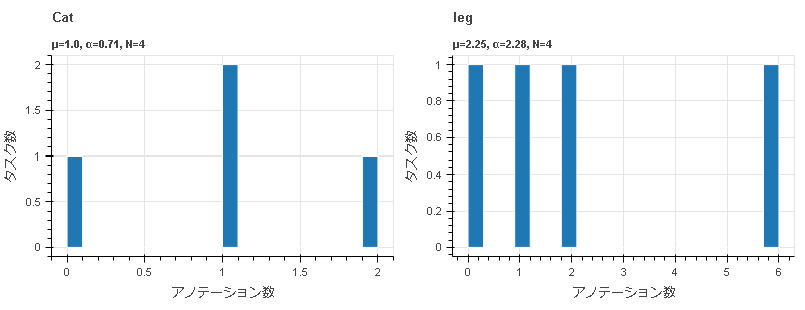
下図は labels_count.html の中身です。ラベル名ごとにヒストグラムが描画されています。
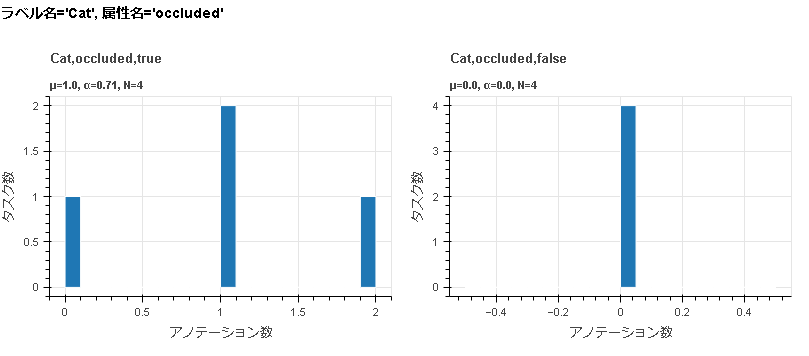
下図は attributes_count.html の中身です。ラベル名、属性名、属性値のペアごとにヒストグラムが描画されています。
集計対象の属性の種類は以下の通りです。
ドロップダウン
ラジオボタン
チェックボックス
デフォルトではタスクごとにアノテーション数を集計します。入力データごとに集計する場合は、 --group_by input_data_id を指定してください。
集計結果をCSV/JSONで出力したい場合は、ラベルごとの集計は annotation_zip count_annotation_by_label を、属性値ごとの集計は annotation_zip count_annotation_by_attribute_value を使用してください。
$ annofabcli statistics visualize_annotation_count --project_id prj1 --output_dir out_dir/ \
--group_by input_data_id
Usage Details#
各ラベル、各属性値のアノテーション数をヒストグラムで可視化したファイルを出力します。
usage: annofabcli statistics visualize_annotation_count [-h] [--yes]
                                                        [--endpoint_url ENDPOINT_URL]
                                                        [--annofab_user_id ANNOFAB_USER_ID]
                                                        [--annofab_password ANNOFAB_PASSWORD]
                                                        [--annofab_pat ANNOFAB_PAT]
                                                        [--logdir LOGDIR]
                                                        [--disable_log]
                                                        [--debug]
                                                        [--annotation ANNOTATION]
                                                        [-p PROJECT_ID] -o
                                                        OUTPUT_DIR
                                                        [--group_by {task_id,input_data_id}]
                                                        [--bin_width BIN_WIDTH]
                                                        [--exclude_empty_value]
                                                        [--arrange_bin_edge]
                                                        [-tq TASK_QUERY]
                                                        [-t TASK_ID [TASK_ID ...]]
                                                        [--latest]
                                                        [--temp_dir TEMP_DIR]
Named Arguments#
- --annotation
アノテーションzip、またはzipを展開したディレクトリを指定します。指定しない場合はAnnofabからダウンロードします。
- -p, --project_id
project_id。
--annotationが未指定のときは必須です。--annotationが指定されているときに--project_idを指定すると、アノテーション仕様を参照して、集計対象の属性やグラフの順番が決まります。- -o, --output_dir
出力先ディレクトリのパス
- --group_by
Possible choices: task_id, input_data_id
アノテーションの個数をどの単位で集約するかを指定します。
Default:
'task_id'- --bin_width
ヒストグラムのビンの幅を指定します。指定しない場合は、ビンの個数が20になるようにビンの幅が調整されます。
- --exclude_empty_value
指定すると、すべてのタスクでアノテーション数が0であるヒストグラムを描画しません。
- --arrange_bin_edge
指定すると、ヒストグラムのデータの範囲とビンの幅がすべてのヒストグラムで一致します。
- -tq, --task_query
集計対象タスクを絞り込むためのクエリ条件をJSON形式で指定します。使用できるキーは task_id, status, phase, phase_stage です。
file://を先頭に付けると、JSON形式のファイルを指定できます。- -t, --task_id
対象のタスクのtask_idを指定します。
file://を先頭に付けると、task_idの一覧が記載されたファイルを指定できます。- --latest
--annotationを指定しないとき、最新のアノテーションzipを参照します。このオプションを指定すると、アノテーションzipを更新するのに数分待ちます。- --temp_dir
指定したディレクトリに、アノテーションZIPなどの一時ファイルをダウンロードします。
global optional arguments#
- --yes
処理中に現れる問い合わせに対して、常に
yesと回答します。- --endpoint_url
Annofab WebAPIのエンドポイントを指定します。
Default:
'https://annofab.com'- --annofab_user_id
Annofabにログインする際のユーザーID
- --annofab_password
Annofabにログインする際のパスワード
- --annofab_pat
Annofabにログインする際のパーソナルアクセストークン
- --logdir
ログファイルを保存するディレクトリを指定します。
Default:
.log- --disable_log
ログを無効にします。
- --debug
HTTPリクエストの内容やレスポンスのステータスコードなど、デバッグ用のログが出力されます。
オーナロールまたはアノテーションユーザロールを持つユーザで実行してください。